Last updated: October 24, 2026. This is an independent guide; we are not affiliated with Chaturbate. This article contains affiliate links; see our Affiliate Disclosure.
Short answer: on a computer, log in at chaturbate.com, open the Security Center (chaturbate.com/security), click 2-Step Verification Settings, and add a device: an authenticator app, a phone number or a security key. Then add a second, backup method. It takes about five minutes and is free.
Why turn on two-step verification?
Two-step verification (2FA) means that logging in needs two things: your password and a short code from a device only you have. Chaturbate says 2-step verification protects your account from phishing and hijacking, and it strongly encourages every member to use it.
This matters more than it might seem. If someone steals or guesses your password, for example through a fake login page, they could spend your tokens or read your messages. With 2FA turned on, the password alone is not enough to get in. You can read more about the common risks in our guide Is Chaturbate Safe?
Before you start
- Use a computer. Chaturbate only lets you set up 2-step verification from a desktop browser. You cannot set it up from the mobile site.
- Go to the real site. Type chaturbate.com into your browser yourself instead of clicking a link from an email or someone’s profile.
- Have your phone ready if you plan to use an authenticator app or text messages.
How to turn on 2FA, step by step
1. Open the Security Center
Log in on a computer and open the Security Center. You can reach it from the “Security Center” link at the bottom of any Chaturbate page, from the “Settings & Privacy” tab of your profile, or by going straight to chaturbate.com/security.
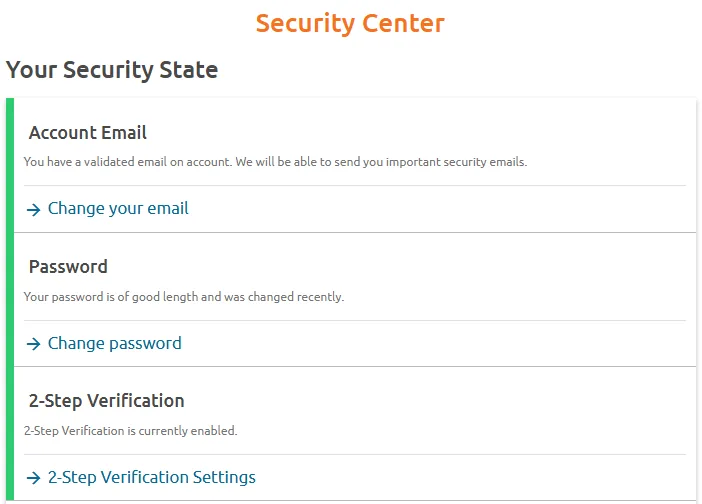
The Security Center checks three things: whether your email address is validated, whether your password is strong, and whether 2-step verification is on. Fixing all three is the quickest way to make your account much harder to break into.
2. Open the 2-Step Verification settings
Click 2-Step Verification Settings. This page shows whether 2FA is on, your security level, and the devices you have added.
3. Add your first device
Choose one of the methods on the settings page and follow the on-screen prompts:
- Authenticator app: click Add Code Generator, scan the QR code with an app such as Google Authenticator or Authy, then type in the six-digit code the app shows.
- Text message or voice call: click Add Phone, enter your number and confirm it with the code you receive.
- Security key: click Add Security Key and follow the prompts to register a FIDO U2F or FIDO2 key.
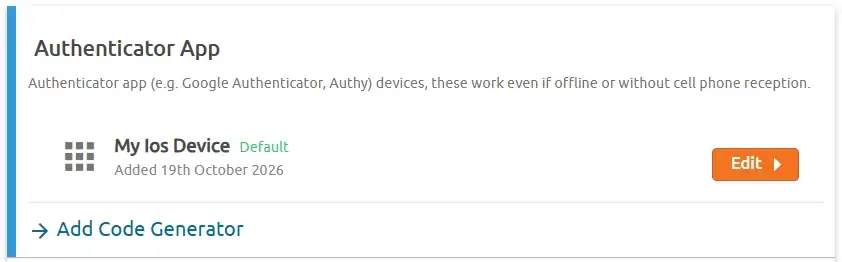
4. Add a backup method
Chaturbate recommends having at least two devices on your account, so you can still sign in if your main one is lost or unavailable. A common setup is an authenticator app as the main method plus your phone number or backup codes as the backup.
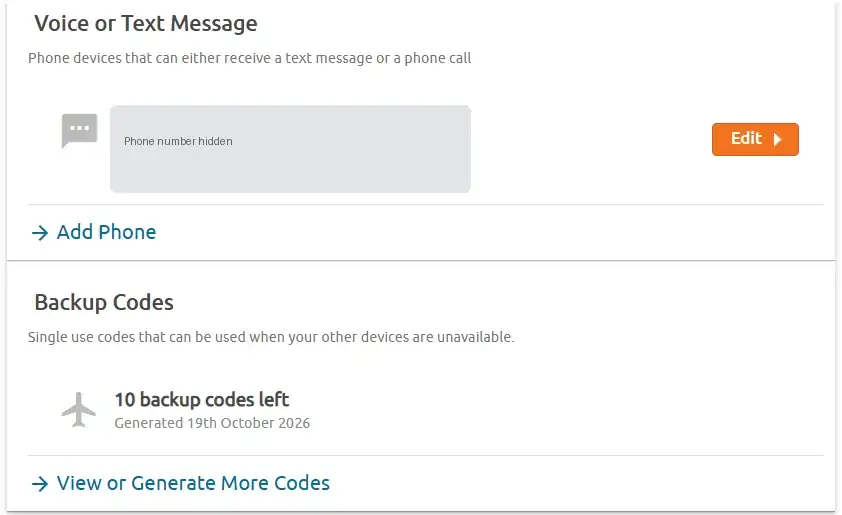
5. Save your backup codes
Backup codes are single-use codes for when your other devices are not available. Click View or Generate More Codes, then save them somewhere private, such as a password manager or a printed copy kept at home. Never save them in a public note or send them to anyone.
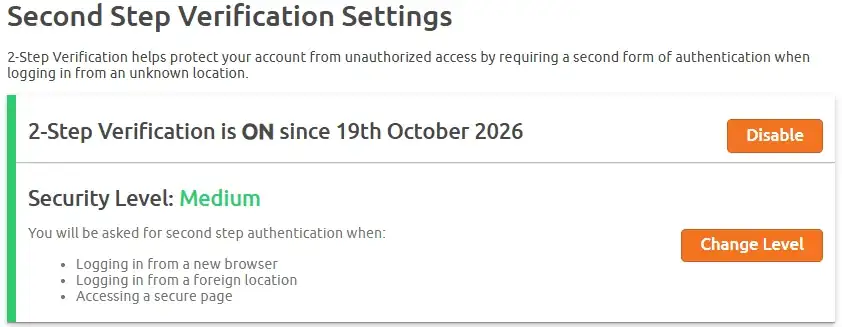
6. Check your security level
Once 2FA is on, the settings page shows your security level. At the “Medium” level, Chaturbate asks for a code when you log in from a new browser, when you log in from a foreign location, and when you open a secure page. You can adjust this with Change Level.
Which 2FA method should you choose?
Chaturbate supports several ways to receive codes. Here is how they compare:
| Method | How you get the code | Good for | Watch out for |
|---|---|---|---|
| Authenticator app | An app such as Google Authenticator or Authy generates it | Most people. Works offline and without phone signal | If you lose the phone, you need a backup method |
| Text message or voice call | Sent to a phone number by text, or read out by an automated call | People who do not want another app. A landline works for calls | Needs signal; the number is shared with Twilio, the service that sends the codes |
| Backup codes | A list of single-use codes you save in advance | Emergencies, when your other devices are unavailable | Each code works once; keep them somewhere private |
| Security key | A physical USB or NFC key (FIDO U2F or FIDO2), such as a YubiKey | The strongest protection | You have to buy the key |
For most people, an authenticator app plus backup codes is the best balance of security and convenience.
Is Chaturbate 2FA discreet?
Yes. According to Chaturbate, authenticator apps show a generic name and do not mention “Chaturbate”. Text messages come from a short code and contain only your code. Automated phone calls have no caller ID and are not listed in any directories. Nobody looking at your phone would see the site’s name.
One privacy note: if you use a phone number for 2FA, Chaturbate’s privacy policy says the number is also shared with Twilio, the service that sends the codes. Twilio does not receive your other account details. If you would rather not share a number, use an authenticator app or a security key instead.
No mobile phone? You can still use 2FA
- A landline works, because the automated system can call you and read out the code.
- A free Google Voice number can be used to receive codes.
- A security key needs no phone at all. A basic FIDO U2F key that plugs into USB is enough for a computer. If you also want to use it with an Android phone, choose a key that supports NFC as well as USB.
Troubleshooting
- The authenticator codes are rejected: check that the date and time on your phone are correct. If the clock is off, the codes will not match.
- The QR code will not scan: zoom in on the page so the code is larger on your screen, then try again.
- You lost your phone: sign in with a backup code or your backup device, then remove the lost device from your 2-step settings straight away.
- You cannot get in at all: contact Chaturbate support through the official help center. Accounts with a verified email address are much easier for support to help with.
Keep your codes to yourself
Never give your password or 2FA codes to anyone, for any reason. Chaturbate warns members to be wary of anyone claiming to work for or represent the site, and you are responsible for the security of your account. If a message, link or “support agent” asks for a code, it is a scam.
FAQ
Can I set up 2FA on my phone?
No. Chaturbate currently only lets you set up 2-step verification from a desktop browser. Once it is set up, you can log in on your phone as normal and enter your code there.
Does 2FA cost anything?
No. Turning on 2-step verification is free, and authenticator apps such as Google Authenticator are free too. The only option that costs money is buying a hardware security key.
Do I need 2FA just to watch?
No. You can watch public rooms without an account. 2FA is for protecting an account once you have one, especially if you buy tokens.
The bottom line
Turning on two-step verification is the single most useful thing you can do to protect a Chaturbate account. Set it up from a computer in the Security Center, add a backup method, save your backup codes, and never share a code with anyone.
Don’t have an account yet? You can create a free account on the official Chaturbate site, then turn on 2FA straight away.